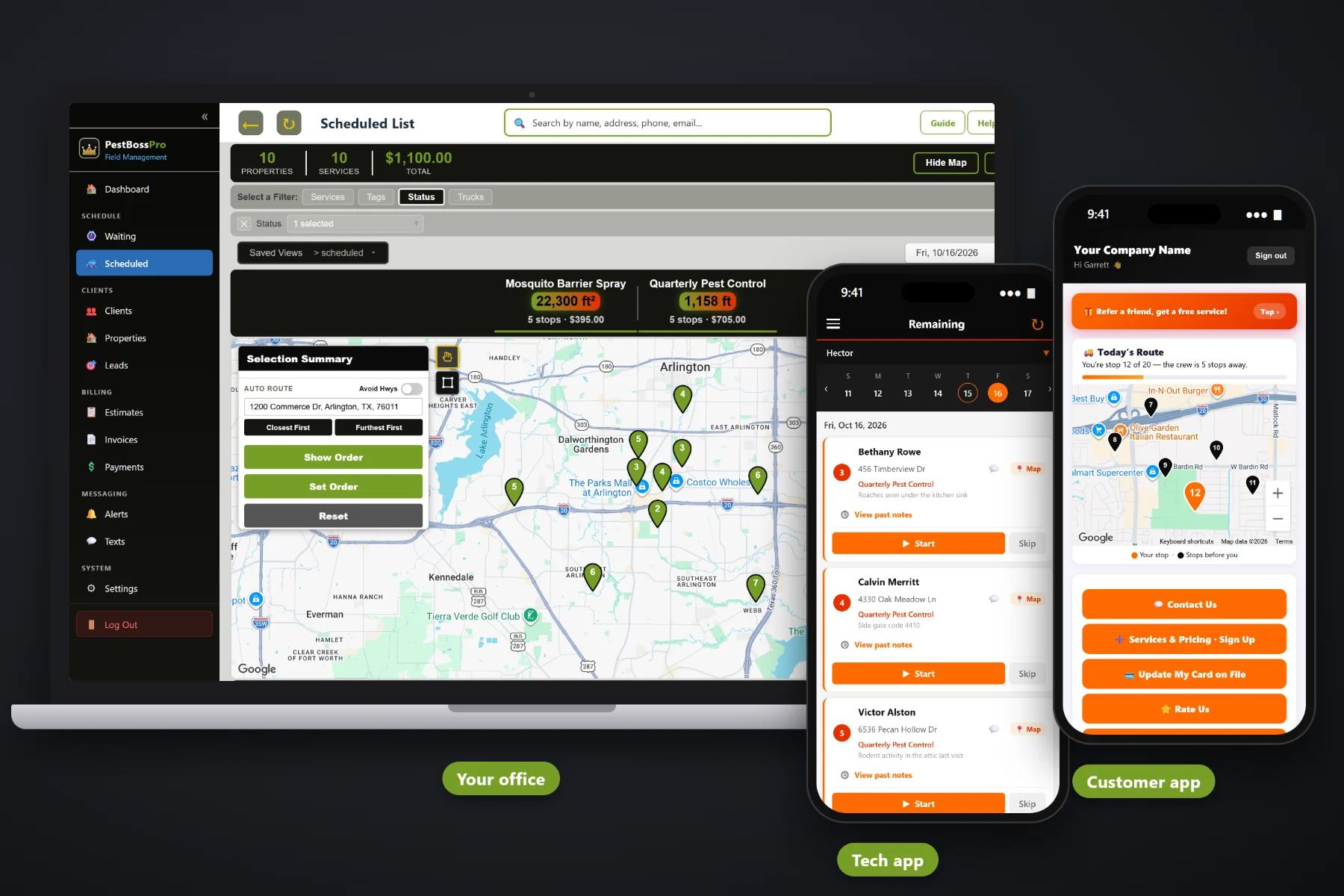
A pest control company runs on recurring accounts, chemical records and routes that change every week. PestBossPro keeps all three in one place: quarterly, bi-monthly and monthly accounts that come due on their own, an application record for every treatment, property measurements from the satellite map, a tech app with the day in route order, a customer app, estimates with online approval, texting and invoicing with card on file.
Plans start at $59/month. Application records, tank mixes, the Waiting List, routing, the tech app, the customer app, estimates and billing are part of the platform, not add-ons bolted on later. For the big picture of how it all fits together, start at PestBossPro, then use this page to dig into what pest control software should do for a company your size.
Every completed treatment with a tracked product gets a record: products, active ingredients, EPA reg. no., rates, amounts, area, target pest, weather and tech license.
Home square feet, perimeter linear feet and mosquito yard area measured on the map, so estimates and mixes start from the real property.
Quarterly, bi-monthly and monthly accounts come due on their own and show as pins: not due yet, due now, overdue.
The day's stops in route order, notes, Start / Skip / Complete, photos, what was applied and payment at completion.
Night-before, on-the-way and arrived texts, two-way texting with the office and automatic post-treatment instructions.
Invoices with sales tax, card on file, auto-charge on completion and one monthly statement for commercial accounts.
Many states require pest control companies to keep records of what was applied, where, when and by whom. PestBossPro helps you keep them by building the record from the job itself: the address, the mix, the products and the tech. A “need a chemical record” button on the schedule shows any completed treatment still missing one. Always check your state lead agency's rules and the product label for what your records must include.
Small pest control companies don't have an IT person or a month to spare for training. PestBossPro is laid out the way a pest company already works: accounts come due, the office builds routes, techs treat and record, customers pay. It runs in the browser on office computers and on the phones your techs already carry.
Bring your customer list in with a CSV import. Imported addresses are placed on the map automatically.
Enter your products with active ingredient, EPA reg. no. and rates, then build the tank mixes your techs actually load.
Quarterly, bi-monthly and monthly plans land on the Waiting List map when their minimum days between visits pass.
Circle an area to build a route, techs run it from the phone, and completion creates the record and the invoice.
Most field-service apps know an address, a date and a price. A pest control visit also has a product, an active ingredient, a rate, a target pest, a site treated and a tech license number. Software that skips that part leaves the most important record of the day on a paper ticket.
Ask a small pest control owner how the week really runs and you'll hear a familiar story: a stack of service tickets on the passenger seat, a spreadsheet of quarterly accounts nobody fully trusts, and a binder of chemical records filled in on Friday night from memory. Then a customer calls asking what was sprayed in their yard and when, and someone goes digging through carbon copies.
Quarterly accounts slip because nobody noticed they were due. Commercial accounts get five invoices when they wanted one. The tech who knows every gate code is out sick. All of it belongs in one system, not in a truck, a binder and somebody's head.
PestBossPro keeps the account, the property, the treatment record and the invoice together, from the first estimate to the fourth quarterly service of the year.
Everything here exists so a one- to five-truck pest company can keep its records, keep its recurring accounts on schedule and get paid without a pile of paper.
A record for every completed treatment with a tracked product, plus a "need a chemical record" button for anything missing one.
Products with active ingredient, EPA reg. no., method and rates. Tank mixes with rates per gallon.
Pull application records for any date range when a customer, an inspector or your own office asks.
Home square feet, perimeter linear feet, mosquito yard area, lawn insect and bed areas, measured on the property map.
Quarterly, bi-monthly and monthly service set by minimum days between visits: 90, 60 or 30.
A live map and list of every account that came due. Circle an area to build a route and schedule it.
Jobs by day and truck, auto-route Closest First or Furthest First from the shop, saved views and printable route sheets.
Company login plus PIN, stops in route order, navigation, notes, Start / Skip / Complete, photos and time clock.
"You're stop 12 of 20 — the tech is 5 stops away." Plus invoices, payments, service requests and sign-ups.
Automatic instructions after service, like keeping kids and pets off treated areas until dry.
Priced from your service list and the property measurements, approved online, turned into scheduled jobs.
Two-way texting plus night-before, when-you're-next and tech-arrived alerts the customer chooses.
Line items, sales tax, auto-charge on completion or on a schedule, online payment and past-due follow-up.
A restaurant group or property manager set to Monthly gets one statement covering every location.
Bring in your accounts with a CSV import and run reports on work, revenue and chemicals.
Start $59, Pro $89 and Crew $199 per month, each with a 14-day free trial.
Every quarterly, bi-monthly and monthly account comes due on its own from its minimum days between visits and lands on the Waiting List map. Pins show not due yet, due now, or overdue past a 7-day grace. Circle a neighborhood, assign it to a truck and a day, auto-route from the shop, and each tech's phone shows the same order as the board. For the full walkthrough, read Pest Control Software: The Complete Guide for Small Pest Control Companies.
A quarterly customer who gets a text the night before can leave the gate open and bring the dog in. A customer who gets an email after service knows to keep kids and pets off treated areas until dry. The customer app shows their place on today's route, their invoices and their card on file, and lets them request a wasp call or sign up for a mosquito program without phoning the office.
Pick the plan that fits your company. Every plan starts with a 14-day free trial and no credit card.
Compare plans on the pricing page.
It is one system that holds your customers and their properties, your recurring service plans, your routes, your chemical application records, your estimates and your invoices. In PestBossPro the office works from a browser and techs work from the tech app on their phones.
Yes. For every completed treatment that used a tracked product, it keeps a record with the date and times, address, mix and products (with active ingredient and EPA reg. no. if entered), rates and amounts, area treated, target pest, site, equipment, tech name and license number, weather and re-entry notes. It helps you keep the records many states require, but check your state lead agency's rules and the product label for exactly what you must record.
Each recurring account has a minimum number of days between visits: 90 for quarterly, 60 for bi-monthly, 30 for monthly. When that time passes, the account shows on the Waiting List map as due. Circle an area to build a route and schedule it.
No app store download. The tech app runs in the browser on iPhone and Android and can be installed to the home screen. Techs sign in with your company login and their own PIN.
Yes, with a CSV import. Imported addresses are placed on the map automatically, so they show up on the Waiting List and in routing.
Start is $59/month, Pro is $89/month, and Crew is $199/month. Every plan starts with a 14-day free trial with no credit card.
This page covers what pest control software should do for a small company. For a tour of every part of the platform, see the full PestBossPro platform overview.
Practical reading on application records, tank mixes, satellite measurements, quarterly service, routes, the tech and customer apps, estimates, texting, billing, imports, reports, choosing software and setting it up.
Recurring accounts that come due on their own, an application record for every treatment, routes on every tech's phone and invoices that charge the card on file. Try PestBossPro free for 14 days.