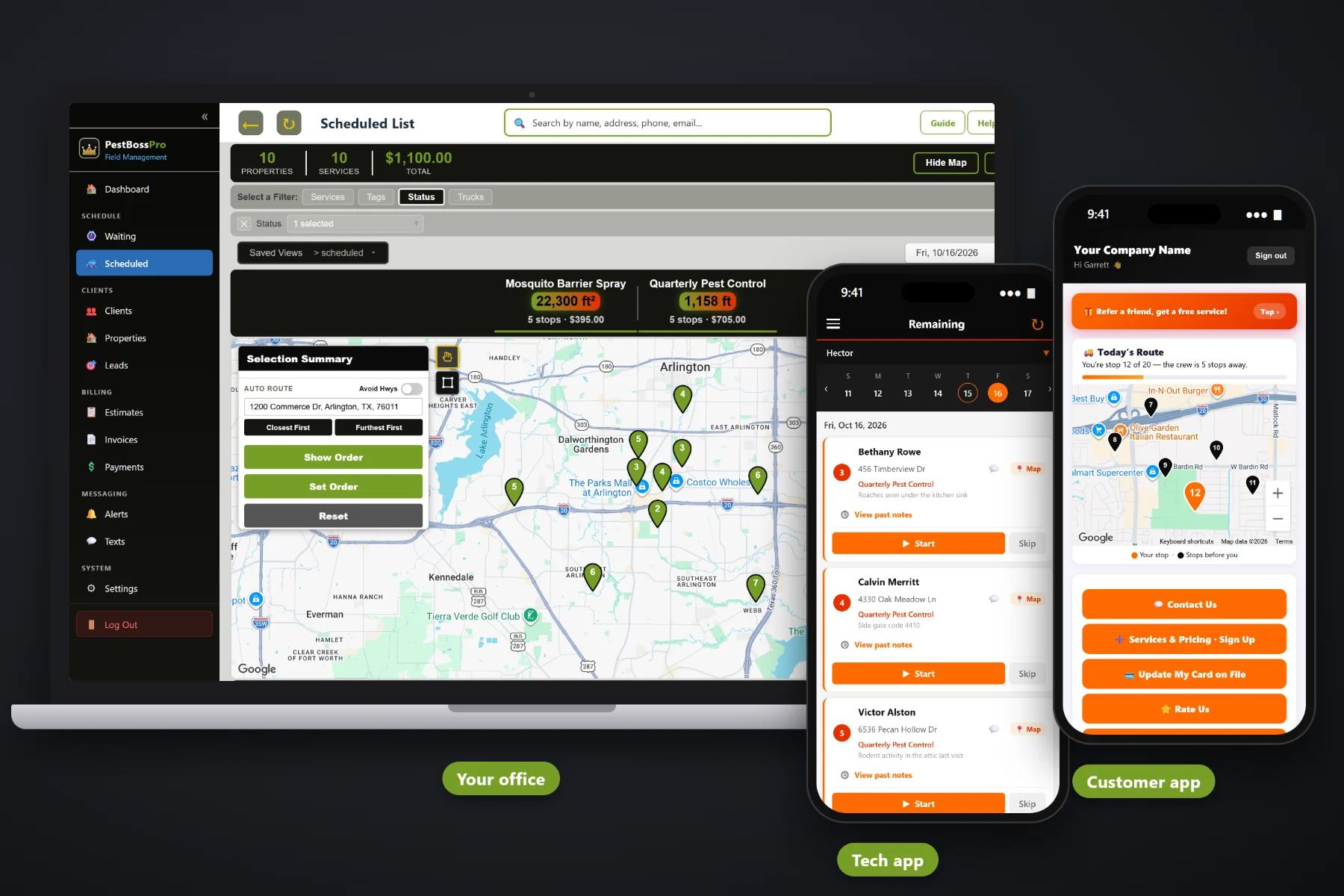
A pest control day is a run of quarterly homes, mosquito yards, rodent programs and a few one-time calls, each with its own gate, its own pets and its own history of where the activity showed up last time. PestBossPro puts the day's stops in route order on the technician's phone, with one-tap navigation, service and access notes on every card, Start / Skip / Complete, a record of what was applied when the treatment is completed, before-and-after photos, automatic on-the-way and arrived texts, and a card-on-file charge when the stop is done.
Plans start at $59/month, and the tech app is part of every plan. The route, navigation, service notes, application records, photos, customer texts and payment at completion come with the platform, not as an add-on. To see how the tech app fits with the Waiting List, routing, recurring service and billing, start at PestBossPro and then dig into the technician's side here.
Each technician sees their own stops in the order set on the dispatch board. Finish a house, read the next card, drive.
Every stop card has a navigation button that opens directions to the address. No typing street names with gloves on.
Gate codes, pets, where activity was seen and what happened on past visits, right under the address.
At completion the tech records the mix and amount used, and that becomes the application record for the stop.
Activity, entry points and bait stations, saved with the stop for the day a customer asks what was done.
Complete creates the invoice and can charge the card on file before the truck leaves the curb.
Whoever sold the account already knows the plan, the gate, the dog and where the ants keep coming in. PestBossPro keeps that on the address and puts it on the technician's phone, along with the notes from past visits, so the tech reads it once at the curb instead of calling the office from the side yard.
Pest control techs did not get into this trade to fill out forms on a phone. PestBossPro asks for a few taps per stop and gives back the address, the history, the way in and a quieter office phone. It runs in the browser on the iPhones and Android phones your techs already carry, with no app store download.
Set up employees with a personal PIN, assign them to trucks, and add your products and tank mixes with their active ingredients and rates.
Quarterly, bi-monthly and monthly accounts come due from each plan's minimum days between visits and land on the Waiting List map.
The dispatch board sets each truck's order, by hand or by auto-routing from the shop, and the tech's phone shows the same order.
Log in with company login and PIN, tap navigation, read the card, tap Start, treat, record what was applied, take photos, tap Complete.
Most field-service apps give a job an address and a notes box. A pest control stop is a service plan, a history of where the activity was, a product mix, an amount applied, a target pest and a gate with a dog behind it. An app that only knows the address leaves half of every stop on a paper ticket.
Ask any pest control tech how the day really runs and you will hear the same story: a printed route sheet that was out of date by 9am, a gate code buried in a group text, a carbon-copy service ticket in the door pocket, and an application record that gets written up at the kitchen table that night from memory. Which mix went down at which house, and how much. Where the rodent activity was last quarter. Whether anybody told the homeowner the truck was coming today.
That information belongs on the address and on the stop, not on a clipboard or in one tech's head. When it shows up on the phone and gets recorded at completion, any tech can run any route and the office stops chasing paperwork on Friday afternoon.
PestBossPro keeps the stop, the treatment, the address and the customer in one place, from the first estimate to the paid invoice.
Every tool here exists to get technicians through a full day of homes, yards and commercial accounts with fewer phone calls, fewer missing records and fewer trips back.
Techs sign in with your company login and a personal PIN, so every stop, photo, application record and clock-in belongs to the right person.
Each tech sees their own stops in the order set on the dispatch board, and the list follows when dispatch moves a stop.
One tap from the stop card opens directions to the address.
Gate codes, pets, locked sheds and which door to use live on the address and show with the stop.
Where activity was seen, conducive conditions and what the customer asked for, written once and shown every visit.
Notes from earlier visits show on the card, so this quarter's tech knows what last quarter's tech found.
Three buttons tell the office what is underway, what is done, and what was skipped and why.
At completion the tech records the mix and amount used. Tracked products become an application record for the stop.
Records carry the products, active ingredients, EPA reg. no., rates, area, target pest, tech license and weather. Reports pull any date range.
Activity, entry points and bait stations, saved with the stop.
Sent automatically. Customers choose night before, when they are next, and when the tech arrives.
Complete creates the invoice and can charge the card on file. Commercial groups can get one monthly statement.
Techs clock in and out on the same phone, so hours are recorded as they happen.
Technician locations show on the office map, so the office knows which truck is closest.
Runs in the browser and installs to the home screen. No app store, no special devices.
Start $59, Pro $89 and Crew $199 per month, with the tech app on every plan.
The tech's list starts on the Waiting List, a live map of every account that has come due. Quarterly, bi-monthly and monthly plans come due on their own from each plan's minimum days between visits. The office assigns stops to a truck and a day, auto-routes Closest First or Furthest First from the shop, and the phone shows the same order. As techs tap Complete, the office sees stops done, photos attached, application records saved and invoices created. A “need a chemical record” button on the schedule shows any completed treatment still missing its record. For a full walkthrough of the tech's day, read Pest Control App: The Complete Guide for Pest Control Companies and Their Technicians.
An interior service only works if somebody is home to open the door, and an exterior treatment goes better when the dog and the kids are already inside. Automatic reminders the night before, on-the-way and arrived texts as the tech works the route, and a live map in the customer app all tell the homeowner when to expect the truck. After the treatment, an automatic instruction email can remind them to keep kids and pets off treated areas until dry. Replies come back to the office through two-way texting, and the invoice, online payment and card on file are all in the customer app.
Pick the plan that fits your operation. Every plan starts with a 14-day free trial and no credit card.
Compare plans on the pricing page.
Their stops for the day in route order. Each card has the address with a navigation button, the service on the stop, access notes such as gate codes and pets, service notes such as where activity was seen, and notes from past visits. They tap Start, Skip or Complete, record what was applied, take before-and-after photos, and the customer gets automatic on-the-way and arrived texts.
No app store download. The app runs in the browser on iPhone and Android and can be installed to the home screen. Techs log in with your company login and their own personal PIN.
When a tech completes a treatment that used a tracked product, they record the mix and the amount applied, and the system keeps an application record with the products, active ingredients, EPA reg. no. if entered, rates, area treated, target pest, technician license number, weather and more. It helps you keep the records many states require. Check your state lead agency's rules and the product label for what you must record.
No. The app needs a data connection to load stops and save completions, photos and records. Most routes have coverage at most stops, and for the few dead zones, the tech finishes the work and completes the stop as soon as the phone has signal again.
The office sees the stop done with its photos, notes and application record, the invoice is created, and a card on file can be charged. Recurring accounts come due again on the Waiting List on their own, based on the plan's minimum days between visits.
Start is $59/month, Pro is $89/month, and Crew is $199/month. The tech app is on every plan, and every plan starts with a 14-day free trial with no credit card.
The tech app is one piece of how PestBossPro runs a pest control company. For the Waiting List, routing, recurring service, commercial accounts and billing, see the full PestBossPro platform overview.
Practical reading on installing the app, logging in, route order, navigation, access and service notes, Start / Skip / Complete, recording what was applied, photos, bait-station checks, customer texts, payment at completion, the time clock, tech GPS and training new technicians.
Stops in route order, notes on every card, application records at completion, before-and-after photos, automatic customer texts and payment at completion on every technician's phone. Try PestBossPro free for 14 days.